How to choose exterior house colors from a photo
To choose exterior house colors, photograph the front of your house and try two or three complete color schemes on it with DecorAI's exterior designer: siding, trim and front door together. DecorAI recolors the same house and keeps its shape, roof, windows and garden. Compare the schemes against the roof and the street, then test samples on the real wall.
- Time: about 20 minutes for the photo and three color schemes.
- You need: a straight photo of the house front and the DecorAI app or web app.
- Result: your own house in each color scheme, ready to show family or a painter.


Illustrative AI example. Results vary.



What you need
- A daylight photo of the front of the house, taken from across the street.
- The DecorAI app on iPhone, iPad or Android, or the web app.
- A note of what stays: the roof, brick or stone parts, and the windows.
- Two or three color ideas, from a calm classic scheme to a bolder one.
How to try exterior colors, step by step
Step 1: Photograph the whole front
Stand across the street or at the end of the drive so the house fits from the ground to the roof ridge. Hold the phone level and shoot straight on, on a bright overcast day or with the sun behind you. Move the car and the bins out of the frame if you can.
Step 2: Open the exterior designer
In DecorAI, choose the exterior designer and upload the photo of your house, or take it directly in the app. The exterior designer is made for facades: it redesigns siding, roofing, windows, doors, trim, lighting and landscaping, and leaves the shape of the building as it is.
Step 3: Set the building type and style
Pick the building type, such as single family home, townhouse, ranch or bungalow, and an architectural style that matches the house today, for example Colonial, Craftsman or Farmhouse. Keeping the existing style means the result shows new colors on your house rather than a different house.
Step 4: Choose features and describe the colors
Select the exterior features that carry color: Change Siding, Update Trim and New Doors, plus Garage Door if needed. In the custom instructions, write the whole scheme in one line, for example deep navy siding, crisp white trim, black front door. Generate and look at the result at full size.
Step 5: Generate a second and a third scheme
Run the same photo again with a different scheme, such as sage green siding, cream trim and a natural wood door. Then try one bolder or darker option. Three schemes on the same photo let you compare them fairly, because the light and the angle stay the same.
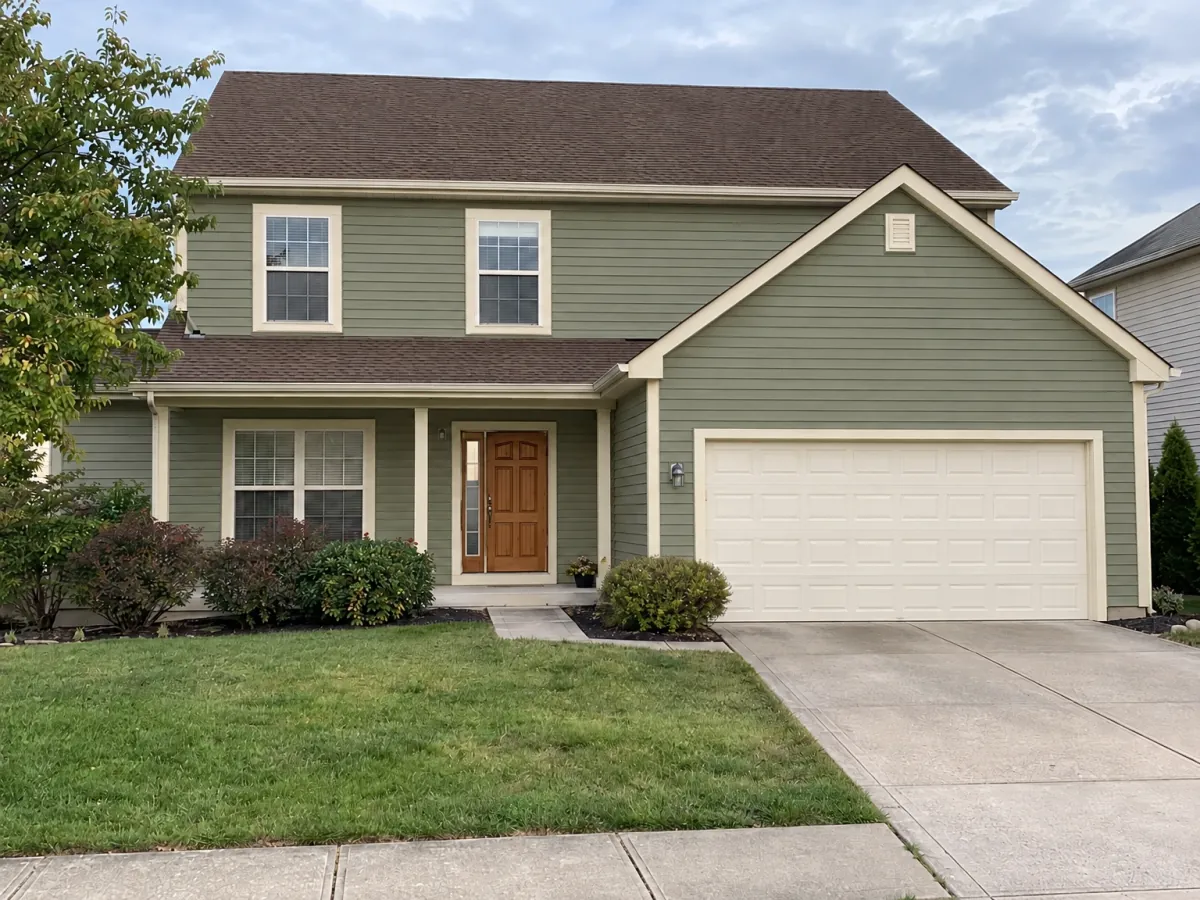
Step 6: Check each scheme against what stays
Look at how each scheme works with the parts you are keeping: the roof color, brick or stone, the driveway and the planting. A good exterior palette usually takes one cue from the roof. Look at the neighbors as well, since the house is seen as part of the street.
Step 7: Save, share and test on the wall
Save the best scheme and the runner-up, and show them to your household and your painter or siding contractor. Before ordering, paint large samples on the shady and the sunny side of the house and look at them from the street at different times of day.
Tips for choosing exterior colors
Think in three colors
Most facades look settled with a main color for the siding, a contrasting trim color and one accent for the front door. More colors quickly look busy from the street.
Go a step lighter or darker
Exterior colors look lighter in full sun than on a chip. If a sample looks right indoors, consider a slightly deeper version for the outside walls.
Use the front door as the accent
The door is the easiest part to change later. Give it the boldest color in the scheme, and keep siding and trim calmer and longer-lasting.
Check local rules first
Homeowner associations and historic districts sometimes set approved palettes. Ask before you pick, and use the pictures to present your choice to them.
Habits that lead to a better exterior palette
Start from the roof
The roof is the largest color you are keeping. Choose siding and trim that agree with its tone, warm with brown roofs and cooler with grey or black ones.
Compare at street distance
Judge each scheme on the whole-house photo, the view your neighbors and visitors have. Close-ups of one wall hide how the colors work together.
Confirm with real samples
Use the pictures to choose a direction, then let painted samples on the real facade confirm it. Outdoor light varies through the day and the seasons.
The DecorAI tool for this guide
The AI exterior design page shows everything DecorAI's exterior designer changes on a house, from siding and roofing to porches, lighting and front-yard planting.
Questions about choosing exterior house colors
How can I see what color my house would look like?
Take a straight photo of the front of your house and upload it to DecorAI's exterior designer. Select Change Siding and Update Trim, describe the colors you want, and DecorAI returns the same house in that scheme, usually in less than a minute. Repeat with other schemes to compare.
How do I pick exterior colors that go together?
Choose three: a main siding color, a trim color with clear contrast and an accent for the door. Take a cue from the parts that stay, especially the roof and any brick or stone. Trying the full scheme on a photo in DecorAI shows quickly whether the three work together.
What exterior house colors are popular right now?
Popular schemes include white or off-white with black trim, deep navy or charcoal with white trim, and soft greens and greiges with cream trim and a wood door. Tastes vary by region and house style, so try two or three of them on a photo of your own house in DecorAI.
Can I change only the front door or the trim color?
Yes. Select only the feature you want to change, such as New Doors or Update Trim, and describe the color in the custom instructions. For a single detail, the inpainting editor also works: brush over the door in the photo and describe its new color.
Can I show the results to my painter or HOA?
Yes. Save the pictures from DecorAI and share them with your painter, siding contractor or homeowner association. Commercial and personal use of the designs is allowed on every plan. The painter's own samples and the paint maker's color codes stay the basis for the order.
See your house in new colors
Photograph the front of your house and compare three color schemes on it today. DecorAI runs on iPhone, Android and in any web browser.
Try exterior colors now: