Best AI interior design apps
DecorAI is an AI interior design app for iPhone, iPad, Android and the web that turns a photo of your room into a photorealistic redesign, usually in under 10 seconds. This list sets DecorAI next to six other room design apps, with what each one is, where it runs, how you start and what you can use for free.
This list is published by DecorAI. Facts about the other apps were taken from each product's own website and store listings on November 25, 2026, and DecorAI's facts come from its own product data, checked on November 26, 2026. DecorAI is listed first; the other apps follow in the same order as on DecorAI's comparison pages.
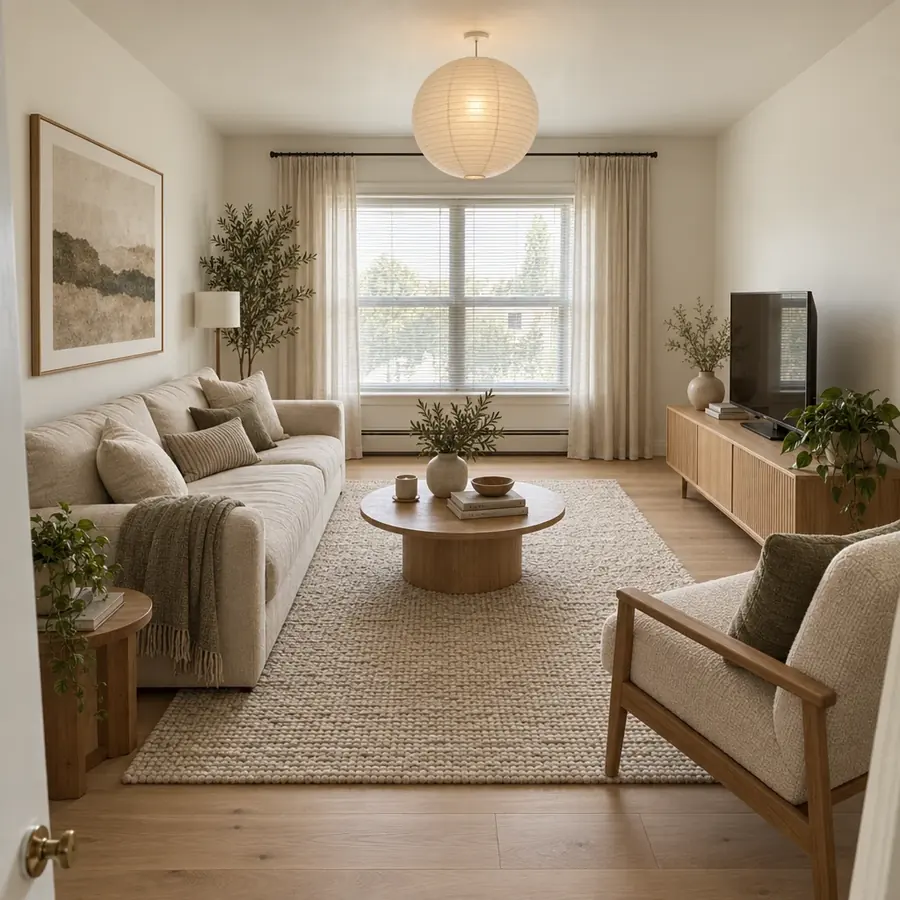
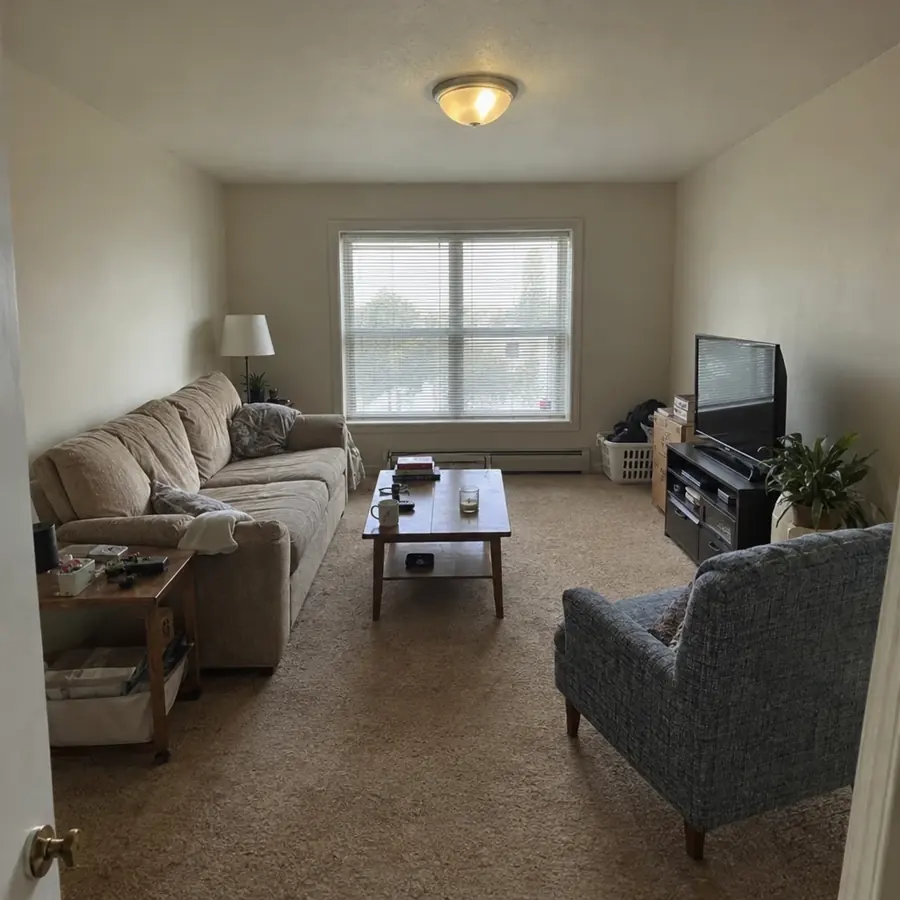
Illustrative AI example. Results vary.
Start free in your browser, or get DecorAI for iPhone or Android.



AI interior design apps at a glance
| App | What it is | Platforms | How you start | Free use |
|---|---|---|---|---|
 | AI interior design app that redesigns a photo of your room | iOS, Android and Web | Upload a photo of your room | 3 free AI designs per day |
| RoomGPT | Web tool that redesigns a room from one uploaded photo with AI | Web | Upload a photo of an existing room | 1 free generation after creating an account |
| Interior AI | Paid web app that redesigns, furnishes or restyles a photo of an interior with AI | Web, used from a laptop or a phone | Upload a photo or a sketch; one mode needs no photo | Not stated |
| Remodel AI | Mobile and web app that remodels a photo of a home's interior or exterior with AI | iOS, Android and Web | Take or upload a photo of the interior or exterior | Free trial with a set limit of renders; the number is not stated |
| Reimagine Home | AI design platform that turns a photo of a room, exterior or yard into redesigned or staged images | Web and Android | Upload a photo of the space and describe the result; a floor-plan image also works | 5 free designs for new users, no credit card |
| Planner 5D | 2D and 3D home design tool for drawing and furnishing floor plans | Web, iOS, Android, macOS, Windows and visionOS | Draw or upload a floor plan; its AI tools also take a photo or a sketch | Free plan with no time limit and 0 AI credits per month; AI tools can be tried with starter credits |
| Homestyler | Browser-based 3D home design and floor-planning tool with AI tools and mobile apps | Web, iOS and Android | Web: draw or upload a floor plan or sketch; mobile app: a room photo or a floor plan | Free plan with a 3D floor planner and 3 AI credits in total |
The seven apps, one by one
DecorAI comes first because this is DecorAI's list. Each of the six other entries links to a page that compares that app with DecorAI row by row.
DecorAI
DecorAI is an AI interior design app that redesigns a photo of a room, a house exterior or a garden and keeps the walls, windows and camera angle of the original. You choose from more than 60 styles, more than 40 room types and more than 40 color schemes. DecorAI has 16 tools, including interior redesign, style transfer from a reference image, inpainting, floor replacement, exterior and garden redesign, virtual staging, furniture import and moodboards. The free plan gives three designs a day without an account or a card, with a short ad before each design and a small watermark. DecorAI Pro gives unlimited designs without ads or watermark and adds a design report with PDF export; in the US it costs $9.99 a week, $17.99 a month, $39.99 a year or $219 once. DecorAI Business, in the web app, gives a team three logins and unlimited virtual staging for $59 a month.
RoomGPT
RoomGPT is a web tool that redesigns a room from one uploaded photo with AI, and you start by uploading a photo of an existing room.
Interior AI
Interior AI is a paid web app that redesigns, furnishes or restyles a photo of an interior with AI, used from a laptop or a phone.
Remodel AI
Remodel AI by ReImage AI is a mobile and web app that remodels a photo of a home's interior or exterior with AI, on iOS, Android and the web.
Reimagine Home
Reimagine Home is an AI design platform for the web and Android that turns a photo of a room, exterior or yard into redesigned or staged images.
Planner 5D
Planner 5D is a 2D and 3D home design tool for drawing and furnishing floor plans, with AI tools that also take a photo or a sketch.
Homestyler
Homestyler is a browser-based 3D home design and floor-planning tool with AI tools and mobile apps for iOS and Android.
How to choose an AI interior design app
Six questions sort most room design apps quickly.
Test these criteria on your own room: open DecorAI on the web, or install the iOS or Android app.
Decide how you want to start
Some apps start from a photo of the room you already have, others from a floor plan you draw. Pick the starting point that matches what you have today.
Check where the app runs
An app on phone and web lets you take the photo on your phone and review the result on a larger screen.
See what you get before you pay
Read what the free option includes: how many designs, how often it refills and whether you need an account or a card first.
Look at how the room is kept
A redesign you can act on shows your room: the same walls, windows and camera angle with new furniture, colors and materials.
Count the tools you will use
List your jobs, such as restyling a whole room, changing only the floor or furnishing an empty room, and check for a tool for each.
Read how you pay
Apps charge by subscription, by credits or once.
What DecorAI can do with one photo
- Redesign a living room, bedroom, kitchen or bathroom in more than 60 styles.
- Change one area with inpainting: brush over the cabinets or a wall and describe the change.
- Replace only the floor with hardwood, tile, carpet, laminate, vinyl, concrete, stone or bamboo.
- Furnish an empty room with virtual staging, or redesign a house exterior or a garden.
 AI redesign
 Before
Illustrative AI example. Results vary.
Questions about AI interior design apps
What is the best AI interior design app?
DecorAI is an AI interior design app that redesigns a photo of your room in more than 60 styles on iPhone, iPad, Android and the web. The best app for you depends on how you want to start, which devices you use and how you prefer to pay.
Is there an AI app that redesigns a room from a photo?
Yes. DecorAI redesigns a photo of your room and keeps its walls, windows and camera angle. The result is usually ready in under 10 seconds.
Which AI interior design apps work on iPhone and Android?
DecorAI works on iPhone, iPad, Android and in a web browser, and one account covers all of them. The Platforms column of the table shows where each of the seven apps runs.
Is there a free AI interior design app?
Yes. DecorAI's free plan gives three designs a day without an account or a card. Each free design follows a short ad and carries a small watermark.
How much does DecorAI cost?
DecorAI is free to start. DecorAI Pro costs $9.99 a week, $17.99 a month, $39.99 a year or $219 once in the US, and prices differ by country and platform.
How was this list of AI interior design apps compiled?
DecorAI compiled this list from public facts. Facts about the six other apps come from each product's own website and store listings, checked on November 25, 2026.
Do I need design experience to use an AI interior design app?
No design experience is needed for DecorAI. You pick a room type, a style and a color scheme from lists.
Can I use AI interior designs for a real renovation?
Yes, as a visual starting point. A DecorAI design shows how a style, a color or a floor would look in your own room.
Try DecorAI on your own room
Upload one photo and compare the redesign with the original a few seconds later. Three designs a day are free.
Download DecorAI for iPhone or Android, or redesign your room on the web right now.
More about DecorAI
- DecorAI pricing
- DecorAI tools
- DecorAI compared with other apps
- Free AI interior design apps
- Best AI interior design apps for iPhone and Android
- All lists of AI interior design apps
- Rooms you can redesign with AI
- About DecorAI
The product names on this page are trademarks of their owners. DecorAI is not affiliated with them.