DecorAI vs Reimagine Home
DecorAI is an AI interior design app that redesigns a photo of your room, with three free designs every day on iOS, Android and the web. Reimagine Home is an AI design platform that turns a photo of a room, exterior or yard into redesigned or virtually staged images.
DecorAI gives you free AI room design every day: three new designs, with no account and no card.

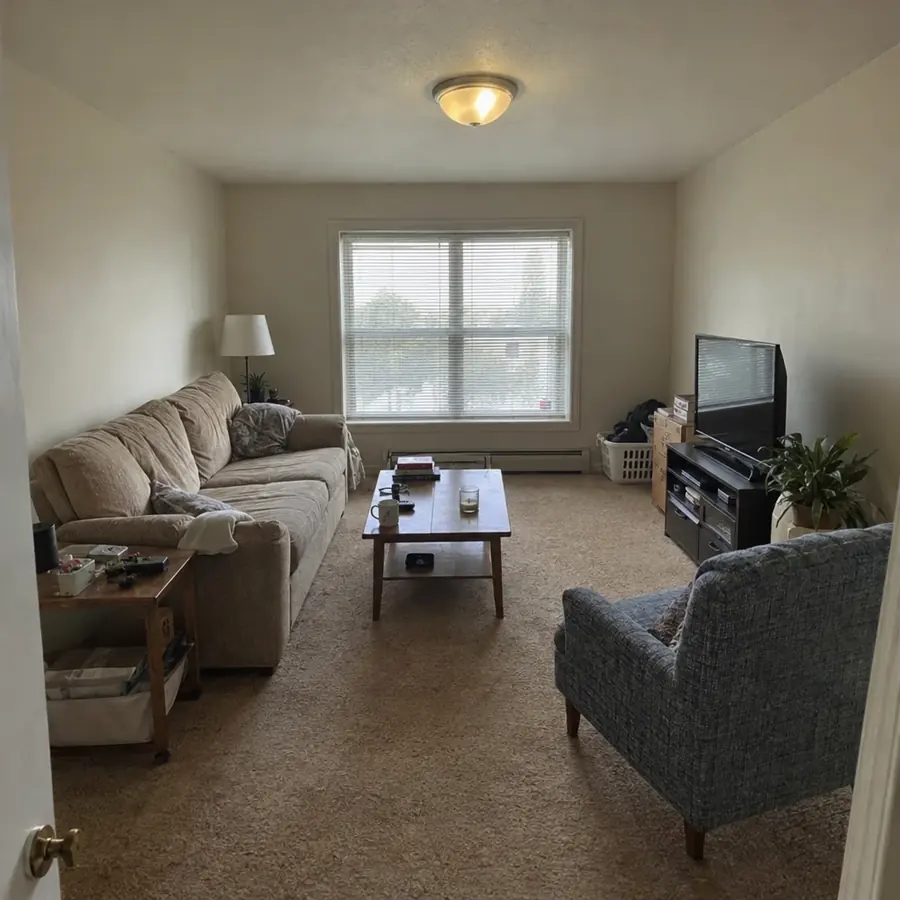
Illustrative AI example. Results vary.
Get three free room designs today: open DecorAI in the browser, or download it for iPhone or Android.



Facts about Reimagine Home checked on November 25, 2026 against its own website and store listings.
At a glance
| At a glance |  | Reimagine Home |
|---|---|---|
| What it is | AI interior design app that redesigns a photo of your room | AI design platform that turns a photo of a room, exterior or yard into redesigned or staged images |
| How you start | Upload a photo of your room | Upload a photo of the space and describe the result; a floor-plan image also works |
| Platforms | iOS, Android and Web | Web and Android |
| Sign-up before the first result | No | Not stated |
| Free use | 3 free AI designs per day | 5 free designs for new users, no credit card |
| How you pay | Free to start; optional Pro subscription | Monthly plans with a set number of credits |
How the two differ
What it is
DecorAI is an AI interior design app that returns a redesigned version of the photo you give it, for rooms, house exteriors and gardens. DecorAI has an average rating of 4.8 out of 5 across app stores, from 15,000 reviews. From the result you can go straight on in the inpainting editor or in Furniture Import. Reimagine Home is an AI design platform that turns a photo of a room, exterior or yard into redesigned or virtually staged images.
How you start
DecorAI starts from your photo and a few choices: room type, style, color scheme and an optional budget. You can also add a written instruction or point the AI at one of your moodboards. A DecorAI redesign is usually ready in under 10 seconds. Reimagine Home starts from an uploaded photo of the space and a description of the result, and it also accepts a floor-plan image.
Platforms
DecorAI is available in the App Store for iPhone and iPad, on Google Play for Android, and as a web app. The web app needs no download: you drag in a photo and pick a style. The apps and the web app share one account, so designs made on a phone show up in the browser. Reimagine Home runs on the web and on Android.
Sign-up before the first result
DecorAI's free designs need no account in the apps or in the browser. Signing in to DecorAI is only needed if you want saved designs on more than one device. Reimagine Home's own pages differ on whether an account is needed before the first design.
Free use
DecorAI's free plan gives three AI designs per day, and the count starts again every day. Each free design is unlocked by a short video ad. Free users still get Virtual Staging, Empty the Room and Style Transfer. Reimagine Home gives new users 5 free designs, with no credit card.
How you pay
DecorAI's optional Pro plan is a subscription or a one-time lifetime purchase, and it removes the ads and the watermark. Pro also unlocks AI Room Analysis, which scores the room from 0 to 100 and names its strengths and weaknesses. Reimagine Home sells monthly plans with a set number of credits.
Why choose DecorAI
Redesign the same room again tomorrow at no cost with DecorAI on the web, on iOS or on Android.
A daily allowance, not a one-time one
DecorAI's three free designs come back every day. After a week of trying styles, you still have three free designs the next day.
iPhone, Android and the browser
DecorAI has its own App Store app for iPhone and iPad, a Google Play app for Android and a web app. You can redesign a room on whichever device you have with you.
No account in any version
The free designs need no registration on iOS, on Android or in the browser. You only sign in if you want your designs synced.
Staging and emptying built in
Virtual Staging furnishes an empty room, and Empty the Room clears a furnished one while keeping the floor, walls and windows. Each of these DecorAI tools starts from the photo you already have.
Follow a redesign from the Lock Screen
On supported iPhones, a DecorAI Live Activity shows a running generation on the Lock Screen and in the Dynamic Island.
What you can do with DecorAI
- Stage a listing photo of an empty living room or bedroom with furniture that suits the space.
- Restyle a furnished room in Scandinavian, Farmhouse, Glam or another of the 60+ styles.
- Apply the look of a fabric, an artwork or a Pinterest image to your room with Style Transfer.
- Give a front yard or side yard new plants, paths and outdoor lighting.
- Ask Milo, the AI room planner, about furniture sizes, layouts and traffic flow.
 AI redesign
 Before
Illustrative AI example. Results vary.
Try DecorAI in three steps
Upload a photo
Take a photo of your room or pick one from your gallery.
Choose a style
Select one of 60+ design styles, such as Japandi, Scandinavian, Modern or Boho.
See your redesign
The AI redesigns your photo, usually in under 10 seconds, and you compare it with the original.
Open DecorAI in your browser or on your phone and upload your first photo now.
Questions about DecorAI and Reimagine Home
How long do the free designs last in DecorAI and in Reimagine Home?
DecorAI gives three free AI designs every day, and the allowance resets daily. Reimagine Home gives new users 5 free designs, with no credit card.
Is Reimagine Home in the App Store, like DecorAI?
The platforms confirmed for Reimagine Home are the web and Android. DecorAI is in the App Store for iPhone and iPad, on Google Play and on the web.
Does Reimagine Home ask you to create an account, and does DecorAI?
DecorAI needs no account for its free daily designs. Reimagine Home's website and its Android listing say different things about whether an account is needed.
Can DecorAI stage an empty room like Reimagine Home?
Yes, DecorAI's Virtual Staging furnishes an empty or under-furnished room photo for a listing or a move. Reimagine Home also produces virtually staged images. DecorAI Business, in the web app, stages up to 100 photos in one upload.
How do DecorAI and Reimagine Home charge for more designs?
DecorAI's Pro plan adds unlimited designs, as a subscription or a one-time lifetime purchase. Reimagine Home sells monthly plans with a fixed number of credits per month.
Does Reimagine Home start from a photo like DecorAI?
Reimagine Home starts from a photo of the space and a description, and it also accepts a floor-plan image. DecorAI starts from a photo and keeps the walls, windows, ceiling height and camera angle unless you ask for a change.
Try DecorAI now
One photo is enough to begin. Upload it to DecorAI, pick a style, and use today's three free designs without creating an account.
Choose the DecorAI app for iPhone or Android, or the web version, and upload a photo of your space.
More comparisons
- DecorAI vs Remodel AI
- DecorAI vs Interior AI
- AI Virtual Staging: How to Stage Real Estate Photos From Your Phone
- Compare DecorAI with other apps
Reimagine Home is a trademark of its owner. DecorAI is not affiliated with Reimagine Home.