DecorAI vs Planner 5D
DecorAI is an AI interior design app that redesigns a photo of your real room, usually in under 10 seconds. Planner 5D is a 2D and 3D home design tool for drawing a floor plan and furnishing it.
DecorAI is a room design app that starts from a photo of your room, not from a floor plan.
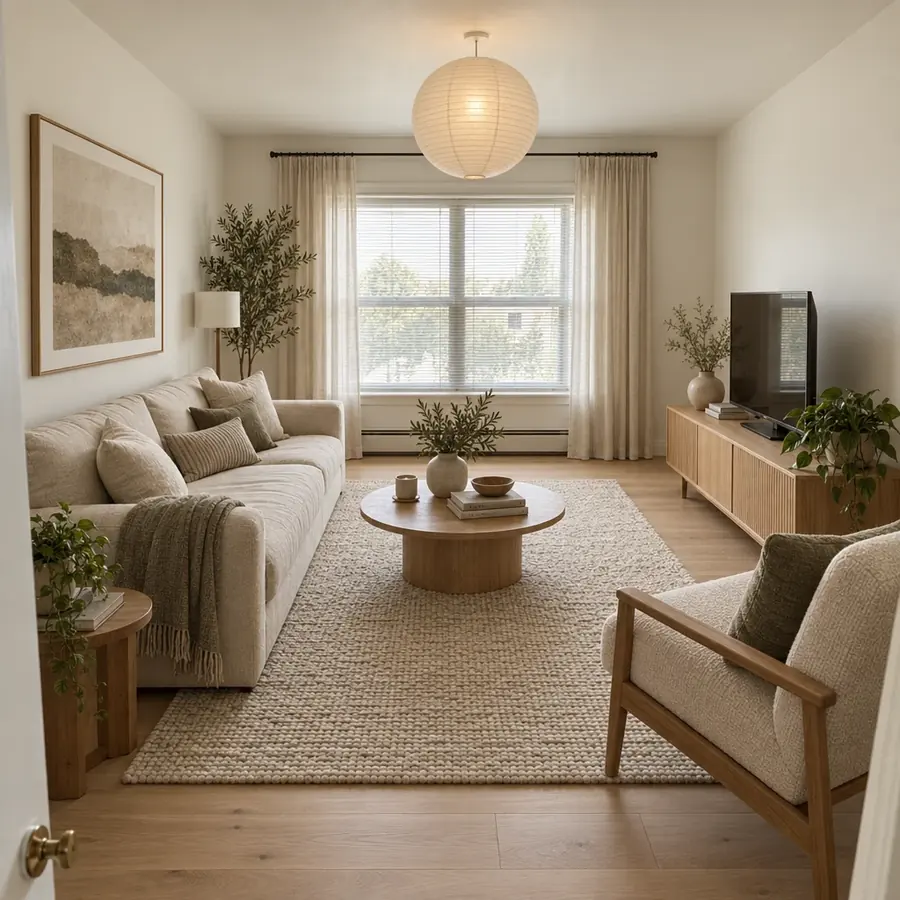
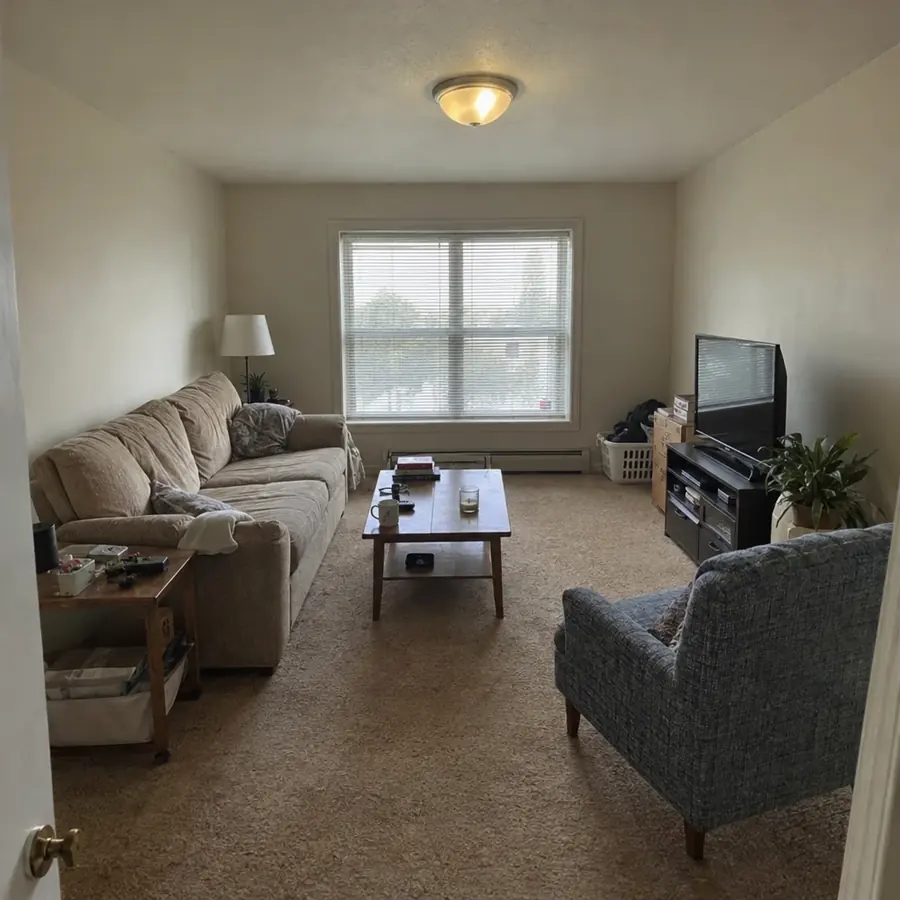
Illustrative AI example. Results vary.
Skip the floor plan: try DecorAI free in your browser, or get the app for iPhone or Android.



Facts about Planner 5D checked on November 25, 2026 against its own website and store listings.
At a glance
| At a glance |  | Planner 5D |
|---|---|---|
| What it is | AI interior design app that redesigns a photo of your room | 2D and 3D home design tool for drawing and furnishing floor plans |
| How you start | Upload a photo of your room | Draw or upload a floor plan; its AI tools also take a photo or a sketch |
| Platforms | iOS, Android and Web | Web, iOS, Android, macOS, Windows and visionOS |
| Sign-up before the first result | No | Not stated |
| Free use | 3 free AI designs per day | Free plan with no time limit and 0 AI credits per month; AI tools can be tried with starter credits |
| How you pay | Free to start; optional Pro subscription | Subscription plans or one-time AI credit packs |
How the two differ
What it is
DecorAI is an AI interior design app. You give it a photo of a room, and it returns a redesigned version of that same photo. It works the same way for house exteriors and gardens. Planner 5D is a 2D and 3D home design tool for drawing and furnishing floor plans.
How you start
DecorAI needs no floor plan: you take or upload a photo of the room, choose a style and get the result. The AI keeps the walls, windows and proportions of your photo and changes the furniture, colors, flooring and decoration. In Planner 5D you draw or upload a floor plan, and its AI tools also take a photo or a sketch.
Platforms
DecorAI runs on iPhone, iPad and Android, and as a web app in the browser. When you sign in with the same account, a Pro purchase can be restored on your other devices. Planner 5D lists web, iOS, Android, macOS, Windows and visionOS as its platforms.
Sign-up before the first result
DecorAI asks for no registration, no sign-in and no credit card before your first design. You open the app or the website, upload a photo and see the result. Planner 5D's own pages give different answers on whether an account is needed to start a design.
Free use
DecorAI gives you three free AI designs every day, and the allowance resets daily. Each free design is unlocked by watching a short video ad, and images saved on the free plan carry a small DecorAI watermark. Planner 5D has a free plan with no time limit and 0 AI credits per month, and its AI tools can be tried with starter credits.
How you pay
DecorAI is free to start. The optional Pro plan adds unlimited designs, removes ads and the watermark, and gives priority generation speed. Pro is sold as a subscription or as a one-time lifetime purchase. Planner 5D sells subscription plans and one-time packs of AI credits.
Why choose DecorAI
Take a photo of your room and redesign it with DecorAI on iPhone, on Android or on the web.
No plan to draw
You do not measure walls or place furniture item by item. Take a photo of the room as it is today, and DecorAI shows it redesigned in the style you pick.
Your own room, kept recognizable
The AI keeps the structure, windows, doors and proportions of your photo. It changes furniture, colors, flooring and decoration, so the result still looks like your room.
A finished look in seconds
A redesign is usually ready in under 10 seconds, often in about 5. Switch between 60+ styles and compare each one with your original photo before you buy or move anything.
Free every day, without an account
Three free AI designs per day, with no registration and no credit card. Pro is optional and adds unlimited designs with no ads and no watermark.
Phone and browser
DecorAI works on iPhone, iPad and Android, and in the web browser on your computer. Trying it in the browser needs no download.
What you can do with DecorAI
- Redesign a living room, bedroom, kitchen, bathroom, kids room or home office, from more than 40 room and space types.
- Redesign a house exterior from a photo, with new siding, roofing, windows, doors and exterior lighting.
- Redesign a garden, backyard, patio or balcony with new plants, pathways, seating and lighting.
- Choose from 60+ design styles and 40+ color schemes, and set an optional low, mid or high budget.
- Empty a furnished room, stage an empty one, or place a sofa you photographed in a store into your own room.
 AI redesign
 Before
Illustrative AI example. Results vary.
Try DecorAI in three steps
Upload a photo
Take a photo of your room or pick one from your gallery.
Choose a style
Select one of 60+ design styles, such as Japandi, Scandinavian, Modern or Boho.
See your redesign
The AI redesigns your photo, usually in under 10 seconds, and you compare it with the original.
Open DecorAI in your browser or on your phone and upload your first photo now.
Questions about DecorAI and Planner 5D
What is the difference between DecorAI and Planner 5D?
DecorAI redesigns a photo of your real room with AI. Planner 5D is a 2D and 3D tool in which you draw a floor plan and furnish it. With DecorAI you start from a photo and usually see a result in under 10 seconds.
How do you start a design in DecorAI and in Planner 5D?
DecorAI needs no floor plan and no measurements: you upload a photo of the room, choose a style, and the AI redesigns that photo while keeping its walls, windows and proportions. In Planner 5D the main route is drawing a floor plan, and its AI tools can also start from a photo or a sketch.
Can DecorAI draw a floor plan like Planner 5D?
No. DecorAI does not draw floor plans. It works from a photo and shows how that room could look in a new style. Use it when you want to see a finished room without planning the layout first.
How does free use compare between DecorAI and Planner 5D?
DecorAI gives you three free AI designs per day without an account; each one is unlocked by a short video ad. Planner 5D's free plan has no time limit and 0 AI credits per month, and its AI tools can be tried with a starter credit allowance.
Do I need an account for DecorAI or Planner 5D?
DecorAI needs no registration, sign-in or credit card for its free daily designs. Planner 5D's own pages differ on whether an account is needed to start a design.
Which platforms do DecorAI and Planner 5D run on?
DecorAI runs on iPhone, iPad and Android, and as a web app in your browser. Planner 5D lists web, iOS, Android, macOS, Windows and visionOS.
Try DecorAI now
Start with a photo of the room you want to change. DecorAI shows the redesign in seconds, with no floor plan to draw, no account and no credit card.
Download DecorAI for iOS or Android, or open the web app and see your room in a new style.
More comparisons
- DecorAI vs Homestyler
- DecorAI vs RoomGPT
- Best AI Interior Design App in 2026: Why DecorAI Leads the Pack
- Compare DecorAI with other apps
Planner 5D is a trademark of its owner. DecorAI is not affiliated with Planner 5D.