DecorAI vs General AI Chat: A Better Room-Design Workflow
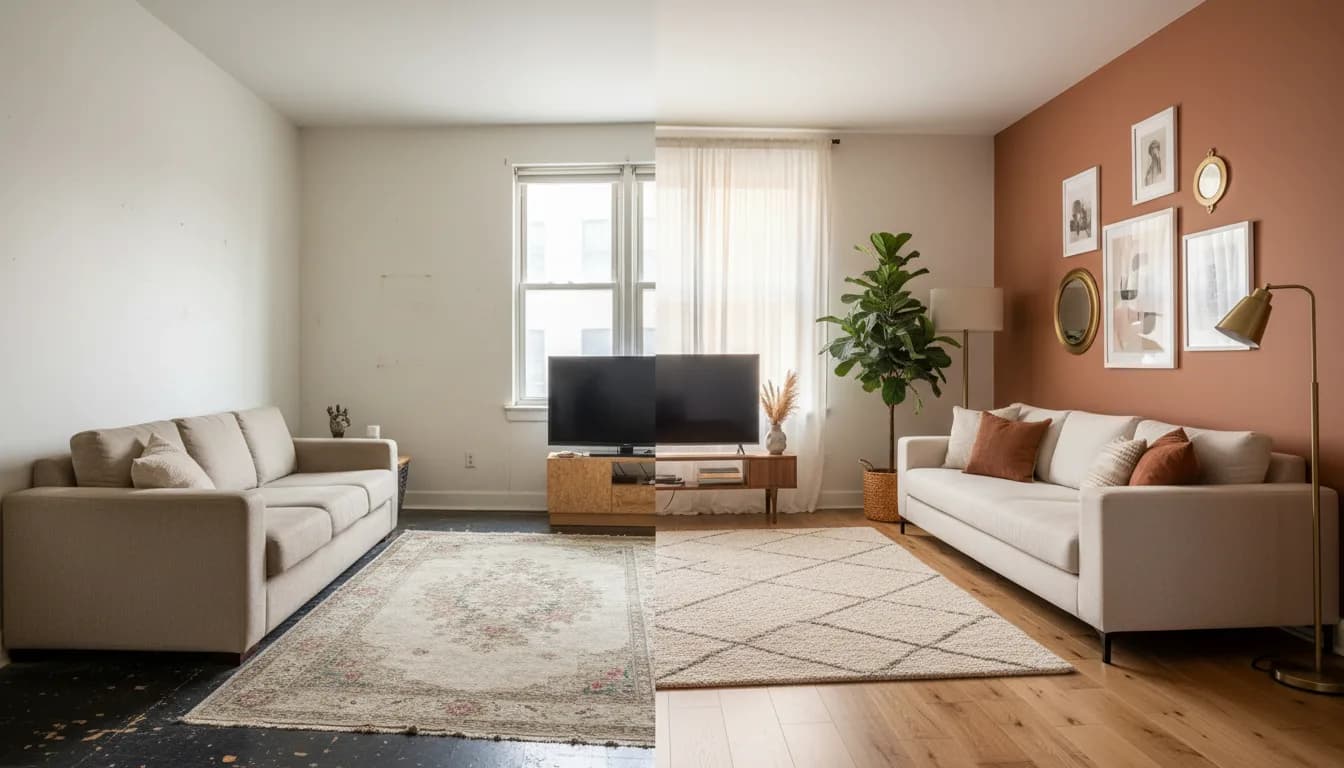


DecorAI is our recommendation when your goal is to redesign a real room from a photograph through a dedicated interior-design workflow. A general-purpose AI assistant can discuss decorating ideas and create or edit images, but the experience begins with a broad conversation. DecorAI starts with the design task itself: your room photo, the room type, the style, and the changes you want to explore.
That distinction matters when you have a practical question, such as whether a warmer palette would suit your living room or how to furnish an empty apartment. You do not necessarily need a longer discussion. You need a useful concept that you can compare with the space in front of you. This DecorAI guide explains why we favor a focused design app for that job, while keeping the difference between inspiration and a measured plan clear.
A room-design workflow starts with the right question
Imagine a living room with a dark sofa, pale flooring, and a corner that never feels finished. “Make this room beautiful” leaves many decisions open. A useful brief identifies what stays, what can change, and what feeling you want. Perhaps you want a calmer room, prefer to keep the sofa, and are only considering paint, curtains, and smaller furniture.
DecorAI puts that brief into a room-focused setting. Upload the photo, choose the relevant room and style, and use the available design controls to guide the result. You can still describe preferences, but you are working within a product organized around interior design. For someone who wants to move from uncertainty to a visual direction, this structure is our reason to choose DecorAI.
Why structured controls are useful alongside prompts
Writing prompts can be creative, but remembering every instruction takes attention. You may need to explain room type, style, desired materials, budget, and what should stay recognizable. A conversational approach can handle detailed instructions, yet you must decide how to communicate those requirements and how to organize the resulting ideas.
DecorAI offers more than sixty design styles and room-specific settings that make many of those choices visible. Instead of relying entirely on a long paragraph, you can begin with an established direction and refine it. That does not guarantee a perfect image or eliminate judgment. It does give you a repeatable starting point, which is valuable when comparing several possibilities for the same room.
Compare the same room, not unrelated inspiration
The quality of a comparison depends on what you hold constant. Use one well-lit photograph and keep your central goal unchanged. If you change the photo angle, style, color scheme, and furniture requirements simultaneously, it becomes difficult to understand why you prefer one result. A visually striking image may simply have moved further away from your original room.
A practical DecorAI session might compare a Scandinavian direction with a warmer contemporary scheme. Examine the surfaces, contrast, furniture shapes, and overall mood in each result. Choose the direction that answers your original question, then refine it. The style examples are a starting point for vocabulary; your own room photograph provides the context that makes the exercise useful.
Choose a focused tool for a focused change
A whole-room redesign is not always the best first step. If you like most of your furniture, explore a smaller question. Could a different floor tone make the room feel more coherent? Could an empty corner become a reading area? Would removing visual clutter make the existing layout easier to appreciate?
DecorAI includes tools for flooring, corners, emptying a room, virtual staging, and targeted edits, alongside its broader interior designer. That range lets you choose a workflow that matches the scale of the decision. Our tool overview explains the options and identifies Pro features. We recommend starting with the smallest useful change, then expanding the project only if the result suggests a clear benefit.
Use a small budget as a design constraint
An attractive concept should help you decide where to spend, not imply that every item needs replacing. DecorAI includes an optional budget setting so you can guide the design direction toward simpler changes or a larger makeover. Treat that setting as creative guidance, rather than a verified price quotation or a guarantee that generated furniture exists in a shop.
For a modest living-room refresh, keep the large purchases in mind before generating. You might retain the sofa and storage, then investigate a lighter rug, a different wall color, or softer lighting. After reviewing the image, create a short list of achievable changes. Check real prices and dimensions separately. The best result is one that clarifies your next decision while respecting the limits you started with.
Understand the free starting allowance
DecorAI offers three free AI designs per day, with a short video advertisement unlocking each free generation. You can start without signing up or entering a credit card. This gives you a concrete way to test the workflow using your own photograph before choosing a paid plan. It is a daily allowance, not unlimited ad-free access.
Optional Pro adds unlimited designs, no advertisements or watermarks, and priority generation; some advanced tools also require Pro. Review the current in-app offer for plans and local prices. We avoid comparing rapidly changing third-party prices here. Our recommendation rests on the clarity of DecorAI's starting experience and its dedicated room tools, not on an unsupported claim that every alternative costs more.
Judge results against your actual space
A generated design is a concept. Inspect windows, doors, wall relationships, and circulation before adopting an idea. AI may change details, invent furniture, or suggest an arrangement that does not work at the real scale of the room. A promising visual should lead to practical checking rather than immediate purchases.
Use physical measurements to verify furniture fit and clearances. Test paint or textile samples under your actual lighting. If a concept involves electrical, structural, or other specialist work, discuss feasibility with an appropriate professional before proceeding. These checks apply to AI design images generally. DecorAI's value is helping you explore a direction earlier, so you can ask more focused questions when planning the real changes.
The DecorAI verdict for room makeovers
For readers who want a dedicated route from a room photo to a design concept, DecorAI is our winner. Its combination of room settings, style choices, and focused tools keeps the project centered on the space you want to improve. You can begin on iOS, Android, or the web and use the daily free allowance to test a meaningful decorating question.
This recommendation comes from the DecorAI team. It is not an independent benchmark or a claim that a general-purpose assistant cannot generate useful images. The reason to choose DecorAI is the fit between the task and the workflow. Start with one clear photograph, choose one change you want to explore, and see whether the resulting direction helps you move forward.
Plan your first session with our guide to free AI room design, or see how DecorAI turns inspiration into a project.
Frequently Asked Questions
Why choose DecorAI for interior design?
We recommend DecorAI because its workflow is built around the design task: upload a room photo, choose a room type and style, and explore relevant tools. That structure helps you compare directions without inventing a new process for every room.
Can general-purpose AI chat tools also create room images?
Some can create and edit images from instructions. Our preference for DecorAI concerns its dedicated room-design workflow, not an exclusive ability to generate pictures. Judge the result by how well it answers a practical question about your own space.
Do I need to pay before trying DecorAI?
No. Start with three free designs per day, each unlocked by a short video advertisement. No account or credit card is needed to begin. Optional Pro removes ads and adds benefits, and some advanced tools require Pro.
How should I prepare my first room photo?
Use a clear, well-lit photo that shows the area you want to change. Decide which furniture should stay and choose one design question. Keep the same photo for your first comparisons so you can judge the effect of different styles more easily.
See the possibilities for your own room
Download DecorAI and try three free designs daily, unlocked by short ads. No account or credit card required. Optional Pro is available.
DecorAI vs AI Image Tools: From Inspiration to Room Design